
Most trip tooling makes the same mistake: it pretends trip planning and being-on-the-trip are the same activity. They aren't. Planning is a desktop job — browser tabs, maps, spreadsheets, reading restaurant reviews three weeks before you leave. Being on the trip is a phone job — one hand, WiFi-less subways, checking a hotel confirmation while boarding a train. Software that tries to do both usually ends up doing neither well.
This post walks through a travel workflow we've been refining for the last year: use a dedicated AI trip planner to build the itinerary before you leave, then hand off to a dedicated travel expense tracker for everything that happens once you land. Specifically, how Plantrip and WanderSpend fit together, using a 5-day Tokyo trip as the worked example. We're also announcing a new Export to WanderSpend button shipping on Plantrip itinerary pages by Friday May 1.
The Planning Phase Has a Different Shape Than the Trip Phase
Think about the last big trip you took. The week before, you probably had Google Maps open in one tab, a spreadsheet in another, a half-read Reddit thread about the "best ramen in Shinjuku" in a third, and a Notes app on your phone with fragments of ideas. The problem wasn't research — it was synthesis. Turning thirty tabs into an actual day-by-day travel itinerary is exhausting.
Now picture the trip itself. You're at Narita, exhausted, trying to remember which train to take. You're at dinner two days later trying to recall what you've spent so far against your trip budget. You're at a museum and realize you still have the printed ticket buried somewhere. The problems are different: retrieval not synthesis, offline not connected, quick not deliberate.
Plantrip: The Trip Planning Side
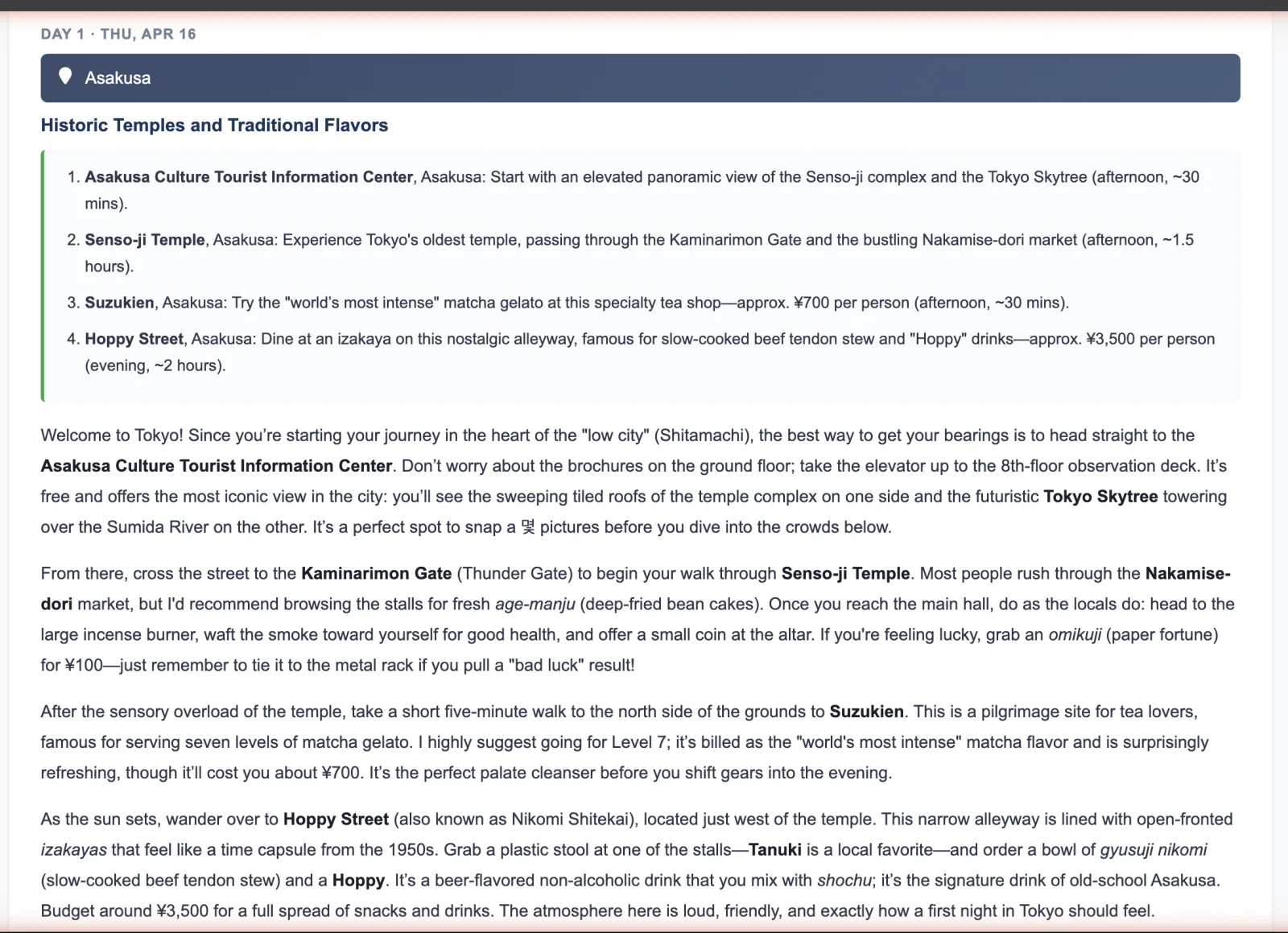
Plantrip is an AI-powered trip planner that generates a structured day-by-day itinerary for any trip in about a minute. Tell it "five days in Tokyo, arriving on a Tuesday, interested in food and modern art," and you get back a full plan: Senso-ji Temple and the Nakamise-dori on morning one, matcha gelato at Suzukien in the afternoon, Hoppy Street for izakaya-hopping that evening. Day two opens with teamLab Planets, moves to Shibuya for a walk to the Scramble Crossing, wraps in Ebisu. Each day comes with an activity outline, transport recommendations, and a full narrative description with the kind of context you'd normally only get from a well-traveled friend.
See it on the Tokyo itinerary we used for this post. Day 1 in particular shows the structure — activity outline and narrative side-by-side — so you can skim or read depending on how much you need. Plantrip also generates a trip packing list, cost estimates per day, and weather context for your dates.
What Plantrip doesn't try to do: live on your phone during the trip. It doesn't track what you actually spend, store your boarding passes, or know that the izakaya we suggested was closed for renovation and you had to find somewhere else at 9pm. That's a different job.
WanderSpend: The Expense Tracking Side
WanderSpend is a travel expense tracking app for iOS and Android, built specifically for the on-the-ground side of a trip. It keeps an ongoing log of what you actually spend, converts currencies automatically, stores boarding passes and hotel confirmations where you can get at them offline (important when your data roaming is flaky or you turned it off to save money), and gives you a running summary of how the trip is going against what you'd budgeted.
Crucially, it isn't trying to be a planning tool. There's no itinerary generator, no "suggest activities," no content. It's infrastructure for the trip itself. That focus is what makes it good — every decision the team has made points at the same question: "what does a traveler actually need once they've landed?" It's also privacy-respecting by default, which matters when you're logging a running list of where you've been and what you've paid for.
The Handoff: From Itinerary to Expense Log
The moment a trip shifts from planning to tracking is real. It usually happens at the airport. You've closed the laptop, the itinerary is printed or screenshotted, and now you just need things to work.
Today the handoff between a trip planner and an expense tracker is manual: you copy key details by screenshotting, or you set up a trip in your expense app separately and re-enter destinations, dates, and estimated budgets. It works, but it's friction that doesn't need to be there — the data already exists in structured form in Plantrip.
What We're Shipping: Export to WanderSpend
We're committing to an Export to WanderSpend button directly on Plantrip itinerary pages, shipping by Friday May 1. The v1 is deliberately boring: one click downloads a JSON file containing the trip structure; open that file in WanderSpend and it builds a trip for you with dates, destinations, and estimated costs already populated. No account linking, no API handshake, no cross-login — just a clean file exchange.
We picked the simplest possible transfer for a reason. Account-linking integrations are a swamp: privacy tradeoffs, auth flows, maintenance overhead, users confused about which product has which data. A JSON file is the smallest thing that works. If it turns out people use it, we can invest more.
Why This Partnership, And Not an Integration with Everything
Plantrip could integrate with a dozen expense trackers. We're not going to, at least not yet — most of them are generic personal-finance tools that happen to handle travel as a category, or enterprise expense-report products. WanderSpend is unusual: purpose-built for travelers, privacy-respecting by default, and the team makes thoughtful decisions we agree with about how travel software should behave. Rather do one integration well than ten poorly.
Read the WanderSpend blog post covering the same workflow from the expense-tracking end.
Try It
To see the workflow end-to-end: generate an itinerary on Plantrip, download WanderSpend on iOS or Android, and watch for the Export button on your itinerary page in early May. Plantrip is free to use for basic itineraries; Plus and Pro tiers unlock longer trips, premium itinerary generation, and saved trip modifications.
FAQ
Can I use Plantrip without WanderSpend?
Yes. Plantrip works standalone — full itinerary, packing list, and cost estimator are all self-contained.
What does the Export to WanderSpend button do?
Starting Friday May 1, the button on every Plantrip itinerary page downloads a JSON file with the trip's dates, destinations, daily activities, and estimated costs. Opening that file in the WanderSpend app creates a matching trip pre-filled with the data.
Is WanderSpend free?
Yes — WanderSpend is free to use.
Does Plantrip plan trips for destinations other than Tokyo?
Yes — any destination worldwide. Tokyo was our example because it's what we built the screenshots around. Start a new itinerary for anywhere you want to go.
Will there be a deeper integration later?
Possibly. For v1 we're shipping the simplest thing that works — a JSON file exchange — so we can learn from real use before investing in account linking or API-based sync.